Free Digital Mockups & Artwork
You do not need finished packaging artwork to start. Send a vector file, a logo, or nothing at all, and tell us where the design stands. Every custom order includes a free digital mockup that you approve before anything is manufactured.
No payment to submit. The mockup is free, and you approve it before production.
What a Digital Mockup Actually Is
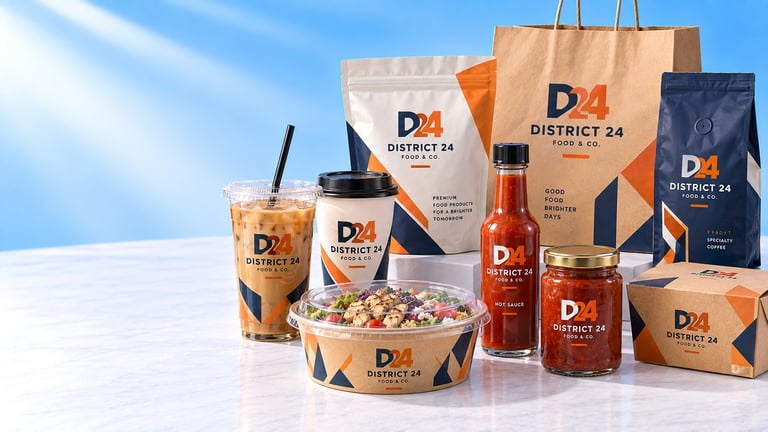
A digital mockup, sometimes called a proof, is a picture of your artwork placed on the packaging you selected. It is prepared for your order specifically, using your logo, your colors and the product and size you configured.
It exists because custom packaging is manufactured after you approve it, not pulled from a shelf. Once a print run is committed, the artwork is committed with it. A mockup is the point in the process where a mistake is still cheap to fix, so it is the step where you should look hardest at spelling, layout and color.
Every custom order includes one, and it is free. It is not a separate service you buy and it is not a premium tier. You see your artwork on the product before a single unit is produced.
What to Send Us
Send as much of this as you have. None of it is required to submit a project, and a missing item is a question we ask rather than a reason we turn the project down.
Your logo, in the best version you have
The vector version if one exists, otherwise the largest high-resolution file you can find. If your logo only exists in a small web file, send it and say so. We will tell you whether it will print cleanly.
Your brand colors
A hex code, a Pantone number, or even a photograph of a business card or signage. Any reference beats none, because it lets us match the color on your packaging to the color your customers already see.
Any existing packaging artwork
If you have artwork from a previous supplier or an earlier print run, send it. Reusing what already exists is usually faster than rebuilding it.
Your fonts, if you know them
If your design uses text, tell us the font names or send the font files. If you don't know, we can set the text in a close match or outline what you send.
The product and size you want
You do not need to have this settled. If you have not chosen packaging yet, configure any product or request a quote and a specialist will help you pick. If you have chosen, tell us the size so the layout is built for the right dimensions.
What the artwork is for
A sentence on the product and the customer. A logo on a coffee cup and the same logo on a retail pouch are built differently, and knowing the use stops us guessing.
How your file actually reaches us
Worth being precise about, because it is easy to assume otherwise. When you pick a file in the configurator or on the quote page, the file is held in your browser and is sent attached to your request when you submit it. Nothing is sent before you press submit, and your specialist confirms what they received when they reply. If you would rather not choose a file at all, select the option that says your artwork is coming later and a specialist will collect it from you directly.
Artwork File Guidance
Four situations, and what each one means for your order. Most customers arrive in the second or third row.
Vector
BestAI, EPS, SVG, PDF
Scales to any size without losing sharpness. Best for printing.
Raster
PNG, JPG, JPEG
Works at the size it was made for. Send the largest version you have.
Logo only
Any of the above
You have a logo but no packaging layout. We prepare the layout.
Nothing yet
No file
Start anyway and tell us what you have in mind. We'll guide you.
- Send the version of your logo made for the background it will sit on. A logo built for white packaging can disappear on a dark bag.
- Keep text as outlines where you can, or tell us the font names. It removes any chance of a font substituting on our side.
- Send the original file, not a screenshot or a photo of a screen.
- If the artwork wraps around a cup or a bag, tell us. The layout has to allow for the wrap, and it changes how the logo is sized.
Print areas and dielines are different for every product and every size. We confirm the printable dimensions for your exact packaging when we review your artwork, rather than publishing a generic template that would not match what you ordered.
Vector vs Raster, in Plain Language
This is the one technical distinction worth understanding, because it is the difference between a logo that prints crisply and one that prints soft.
Vector: drawn with math
A vector file stores your logo as a set of instructions: draw a curve here, a line there, fill this shape with this color. It is not a picture of your logo, it is a recipe for drawing it.
That is why size does not matter. The same file draws cleanly on a small label and across an entire bag, because it is redrawn at whatever size you ask for rather than stretched.
AI, EPS, SVG, PDF
Raster: drawn with dots
A raster file is a grid of tiny colored squares, called pixels. At its intended size it looks perfect. Enlarge it and you are not adding detail, you are making each square bigger, so edges soften and text loses its crispness.
Raster is not a mistake. If it is what your designer gave you, or all you have, send the highest resolution version you can find. Larger is almost always better than smaller, and we will tell you honestly if it is not going to print well.
PNG, JPG, JPEG
If you only have a raster logo: send it anyway. Plenty of orders start exactly there. We will tell you what it can and cannot do before you commit, and if a clean print needs your logo redrawn, that is a conversation we have with you rather than a surprise on the pallet.
Colors and Brand References
Color is the part of a packaging order people are most often surprised by, so it is worth knowing how matching works before you approve anything.
Every screen shows color differently. Your phone, your laptop and our monitor do not agree, and none of them is the printer. So a mockup is a color reference, not a color guarantee. What it does is let you catch a wrong color early, and give us the reference we need to match it.
The more specific your reference, the closer the match. A hex code is better than a description. A Pantone number is better still. A physical sample, a business card, a menu or a piece of existing packaging is the strongest reference you can give us, because it is the one thing that is not mediated by a screen.
Best references, strongest first
- 1A physical sample: a business card, menu, signage photo or a piece of your current packaging
- 2A Pantone number, if your brand guidelines specify one
- 3A hex code from your brand guidelines
- 4A vector logo file that already carries the correct colors
- 5A description in words, which we will treat as a starting point and confirm with you
Placement: Where Your Artwork Sits
Placement changes how a product feels in the hand, and it is the easiest thing to get wrong because a flat design never shows you what it looks like wrapped around a cylinder or folded into a bag.
A cup is the clearest example. Artwork on a curved surface is distorted by the curve, so a logo that looks balanced on your screen can read as stretched or crowded once it is on the cup. How much surface you fill changes that further: a single small logo, artwork repeated on opposite sides, and a full wrap each behave differently, and each is sized differently for the same cup.
Other products carry their own constraints. Bags have a fold and a seam. Pouches have a gusset, which is a panel that disappears when the pouch is filled and stood up. Boxes have a lid and panels that meet. None of these are problems, but all of them mean the printable area is narrower than the flat measurement suggests.
This is the specific thing the mockup resolves. It shows your artwork on the actual product shape, so you see the curve, the fold and the proportion before you approve it.
One side
A single logo or graphic panel. Reads from one angle, and leaves the rest of the surface clean.
Two sides
Artwork repeated on opposite sides, so the branding reads from either direction the product is held.
Full wrap
Artwork continues around the product. Fills the surface and shows best on cup walls and bag panels.
Which placements are open to you depends on the product and the size. We confirm the available print areas for your exact specification during artwork review.
What Happens After You Send Your Artwork
This is the sequence, in order. It is the same path whether you sent a print ready vector file or nothing at all.
- 1
You submit your project
Configure your packaging and submit. No payment is required at this stage, and submitting does not place an order.
- 2
A specialist reviews the project
We look at the product, the size, the quantity, the artwork situation and your delivery details together, because they affect each other.
- 3
Your artwork is checked
If you sent a file, we check that it is usable and that nothing is missing. If it is not going to print cleanly, we tell you now rather than later.
- 4
The mockup is prepared
Your artwork is placed on the packaging you selected, at the size and position it will actually print.
- 5
You receive it and review it
Look closely at spelling, layout, proportion and color. This is the moment you are meant to catch anything wrong.
- 6
You approve it, or you tell us what to change
If something needs to change, tell us and we will adjust it. Most projects need at least a small correction, and saying so is normal rather than inconvenient.
- 7
Pricing and payment terms are confirmed
Once the design is settled, you receive final pricing, applicable freight and payment terms for the exact configuration.
- 8
Production begins
Manufacturing starts only after the artwork is approved and payment requirements are satisfied. Then the finished order is delivered nationwide.
We do not publish a fixed turnaround for mockups. It depends on the product, the state of your artwork and how busy the studio is, so the honest answer is that your specialist tells you when yours is ready rather than the website promising a number. See the full ordering process
Once your artwork is settled, the next stage is turning it into something a press can run. That covers why surfaces behave differently, why the same color shifts between materials, and what is checked before your order ships.
Custom printing & productionRevisions and Approval
Approval is the step that protects your order, so it is worth being clear about how it works.
You are asked to approve the mockup before production starts. You are not approving a suggestion or a rough direction, you are approving the artwork that will be manufactured. That is why it is worth reading the copy on the mockup character by character and checking the color against a real reference rather than your memory of it.
If something is wrong, tell us and we will adjust it. Fixing a layout, a placement or a color at this stage is a conversation. Fixing it after the print run is a reprint, which is why we ask you to look properly rather than click through quickly.
We do not publish a revision limit, and we are not going to invent one here to sound generous. What we will say plainly is that changes before production are expected and normal, and that the goal of the process is a mockup you are genuinely happy to approve. If your project needs something outside the usual path, a specialist will tell you what is possible for it.
What to check before you approve
- Your business name, spelled exactly as you spell it
- Any tagline, phone number, address or social handle on the artwork
- The logo itself, including whether the correct variant was used
- The size and position of the artwork on the product
- The colors against a real reference, not against memory
- Anything you asked us to change, changed the way you expected
What the Mockup Does, and Does Not, Guarantee
A mockup is a real and useful safeguard. It is also a picture, so it is worth knowing exactly where its authority ends.
What it does
- Shows your artwork on the packaging you selected before anything is manufactured
- Shows where your logo sits, how large it prints and how it is positioned
- Confirms the spelling of your business name, tagline and any copy on the artwork
- Shows your brand colors as they are intended to appear
- Gives you something concrete to approve, or to correct, before tooling is committed
What it does not
- Guarantee the printed product will look identical to your screen. Screens and printers render color differently, so a close match is the honest expectation
- Prove a material, a barrier or a food-contact certification. Those are confirmed separately for your exact product
- Set a production schedule or a delivery date
- Replace a physical sample where a physical sample is the only way to judge a material
- Mean the order is placed. Nothing is manufactured until you approve and payment terms are satisfied
Material specifications, any food contact documentation and certifications are confirmed separately for the exact product being manufactured. We do not state those on the strength of a picture.
From Mockup to Pricing to Production
An approved mockup is not a purchase. It is the design half of the project, and pricing is confirmed against the whole thing: the product, the size, the print coverage, any matched accessories, the quantity and the delivery destination.
That last part is why a price is not a single published number. Two orders for the same cup at the same quantity can land differently depending on print coverage and freight, so the quote is assembled for your configuration rather than read off a price list.
Once you have approved the design and the pricing, payment terms are confirmed and manufacturing begins. Then the completed order is delivered to your address.
Not Sure What to Put Your Logo On?
You do not need to have chosen packaging to start. Pick the family closest to your business, or ask a specialist and they will recommend based on what you sell and how it leaves your counter.
Cups & Drinkware
Cold cups, hot cups, ice cream cups, lids, sleeves and carriers.
View ProductsBags & Bakery
SOS bags, takeout bags, bakery bags, bread bags and sandwich bags.
View ProductsPouches & Retail Food
Stand-up, flat-bottom, coffee, tea, spice and snack pouches.
View ProductsFoodservice
Greaseproof paper, deli paper, container liners and food labels.
View ProductsBottles & Jars
Glass bottles, jars and sauce bottles for retail and food brands.
View ProductsBrowse Everything
The full catalog of custom packaging, by product and by industry.
View ProductsAlready know your product? You can upload your artwork and request a quote in one step, and a free digital mockup comes back with your pricing.
Artwork and Mockup Questions
Is the digital mockup really free?+
What exactly is a digital mockup?+
Do I need finished packaging artwork to start?+
What is the difference between vector and raster files?+
Does the website upload my artwork file?+
How do I get my brand colors right?+
Will the printed packaging match the mockup exactly?+
How many revisions do I get?+
How long does the mockup take?+
What if my logo is low resolution?+
Do I approve the artwork before production starts?+
What should I check on the mockup?+
Can I use artwork from a previous supplier?+
Does the mockup prove my packaging is food safe or certified?+
Send What You Have. We'll Build the Mockup.
A vector file, a logo, or an idea. Configure your packaging, tell us where the artwork stands, and a free digital mockup comes back with your pricing.
No payment required to submit your project. Your artwork is reviewed and a mockup is prepared before you are asked to pay anything.